Switch 2 vs Switch 1 Differences and If the Upgrade Is Worth It
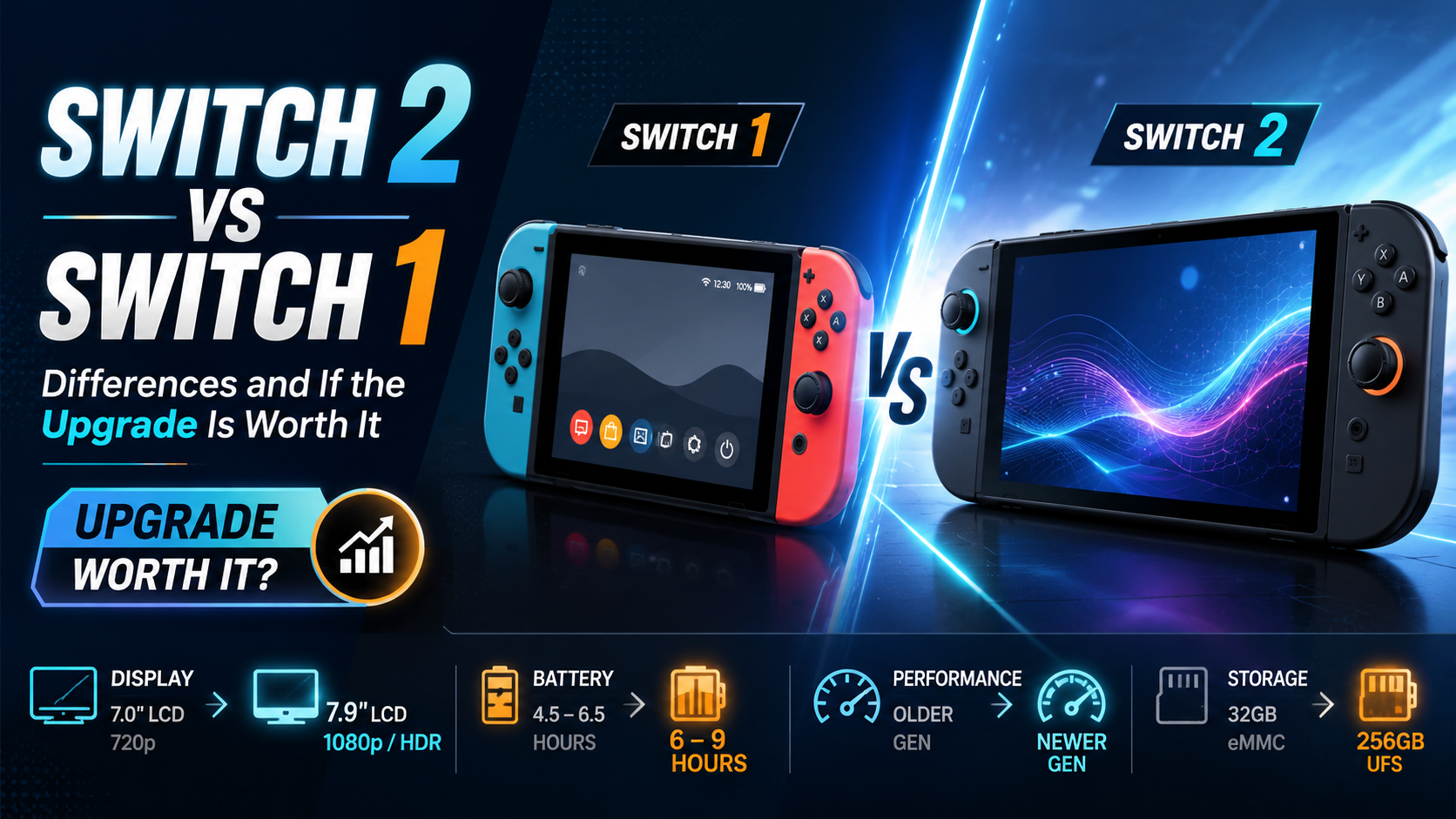
A Switch 2 vs Switch 1 comparison of the screen, performance, Joy-Con, games, and backward compatibility, so you can see the gap and whether to upgrade.
If you are deciding whether to upgrade or stick with your current console, a clear switch 2 vs switch 1 comparison makes the choice much easier. This article walks through the differences one area at a time, from the screen and visuals to performance and load times, the Joy-Con and new features, and how games and backward compatibility work. The goal is to show what you actually get for paying more, and whether that gap matters enough for your play style to justify upgrading. Some figures here are reference points, since they vary by revision and region, so confirm against official information before you buy. We keep the focus on real differences you will feel while playing, not just spec sheet numbers that look big but change little in practice.
What are the main Switch 2 vs Switch 1 differences
Before the details, look at an overview of how the two consoles compare side by side in this table, which makes it clear where the Switch 2 steps up from the original.
Feature | Switch 1 | Switch 2 |
Handheld screen | 6.2 inch (7 inch on OLED) at 720p | 7.9 inch at 1080p with HDR up to 120fps |
Docked output | Up to 1080p | Up to 4K |
Processor | NVIDIA Tegra X1 | A new custom NVIDIA chip, clearly stronger |
Internal storage | 32GB (64GB on OLED) | 256GB, expandable via microSD Express |
Controllers | Rail attached Joy-Con | Joy-Con 2 attach magnetically and act as a mouse |
Games | Plays Switch games | Plays nearly all Switch games, plus new exclusives |
The figures in the table are based on announced information and may differ slightly by revision or update, so check against official sources once more.
For the full pricing and spec breakdown of the new console, read the Nintendo Switch 2 price and specs guide
How clear is the screen and visual difference
The quickest change to notice is the screen. The Switch 1 uses a smaller display at 720p in handheld, while the Switch 2 moves up to a larger 1080p panel with HDR and smooth visuals up to 120fps, making handheld games look noticeably sharper. Connected to a TV through the dock, the gap widens, since the old console tops out at 1080p while the new one pushes up to 4K. Anyone who mostly plays on a big TV will feel this upgrade right away, and even handheld players get an easier on the eyes screen and smoother motion than before. The higher refresh rate is easy to take for granted at first, but going back to the older panel afterward makes the jump obvious.
Are performance and load times really better
Behind the visual gap is a much stronger processor. The Switch 1 runs on the aging NVIDIA Tegra X1, while the Switch 2 uses a new custom chip that is several times more powerful. The result is that big games run more smoothly, load times shrink, and frame rates hold steadier in busy moments where the original tends to dip. That extra power also opens the door to games that were too demanding for the Switch 1 to run at all. So if you mainly play graphically heavy or open world games, this difference shows up in actual play far more than it does on paper. Shorter waits between loading screens also add up over a long session, quietly making the newer console more pleasant to sit with.
What does Joy-Con 2 add over the old controllers
Controls see an interesting change too. The Switch 1 Joy-Con slide onto rails, while the new Joy-Con 2 attach magnetically, which is easier to snap on and holds more securely. The genuinely novel part is that the controllers can work as a mouse, opening up games that need aiming or precise control. There are also communication features during play that make chatting and sharing your screen with friends easier, with a dedicated button to call them up. These do not change how you play at the core, but they make playing with friends and controlling certain games smoother in everyday use.
To see what games are coming to the new console, check the Nintendo Switch 2 games list
Can you play original Switch games on Switch 2
One of the biggest worries is your existing library. The good news is that the Switch 2 is built to play nearly all original Nintendo Switch games, so you do not have to leave your collection behind and can keep playing on the new console. Many older games even benefit from the stronger hardware, loading faster and running more steadily in some cases. At the same time, the Switch 2 has new games designed specifically for it, which is the main reason many players want to move up. Compatibility for some accessories may vary, so check the official details if you have older gear you want to keep using. For most players, though, the core promise holds, and your existing games simply carry over.
For standout titles to play on the new system, see the best Nintendo Switch games
The short answer on upgrading versus staying put
To make the decision simpler, look at these two groups:
Upgrade to Switch 2 if you mostly play on a 4K TV, follow new releases closely, or want a clearly better and smoother picture.
Stay on Switch 1 comfortably if you still enjoy your current library, are not rushing for new exclusives, and would rather wait for a better price or more games you want.
With every difference laid out, the right call usually comes down to which screen you play on most and how many new games you actually plan to play. Weigh those two against your budget, and the choice gets a lot easier to make. There is no wrong answer here, only the one that fits how and where you actually play.
Got the new console and want to try a launch game, follow the Mario Kart World unlockables guide